Returns v2
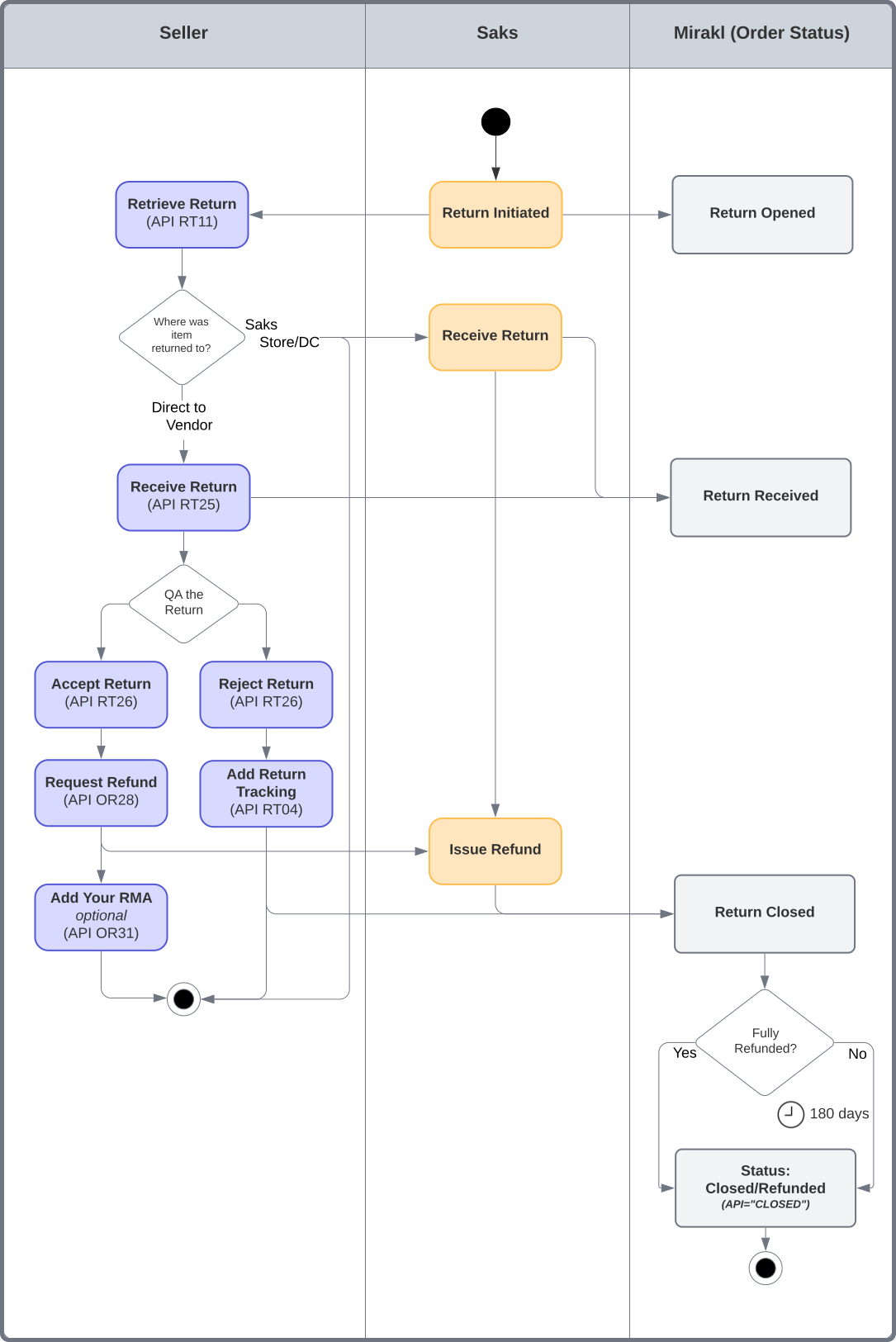
Return Life Cycle Workflow
API Reference
Customer Returns via Direct Mail
A customer can request a return from their saks.com account or by contacting our customer service team. They will be provided with a postage paid return label and instructed to ship the item back directly to you. You will QC and either accept or reject the return. If accepted, Saks will issue the refund to the customer. If rejected, you will return the item back to the customer.
The flow of managing returns is as follows:
- You retrieve your open returns, and create the returns in your system if needed.
- Once you're in posession of the return, mark it as received.
- Quality check the return, then either accept or reject it.
Step 1: Retrieve Open Returns
To start, you must retrieve your open returns by querying on the returns that are IN_PROGRESS.
Example:
{
    "data": [
        {
            "date_created": "2025-04-02T16:28:29.969Z",
            "documents": [],
            "id": "40753532-c512-4443-8e17-7f65e76ac964",
            "last_updated": "2025-06-02T20:00:53.066Z",
            "method_code": "RETURN_METHOD_BY_MAIL",
            "order_commercial_id": "318986959-5006055",
            "order_id": "318986959-5006055-A",
            "reason_code": "RETURN_CHANGED_MIND",
            "rejection_reason_code": null,
            "return_address": {
                "city": "New York",
                "country_iso_code": "USA",
                "state": "NY",
                "street1": "225 Liberty Street",
                "street2": null,
                "zip_code": "10281"
            },
            "return_lines": [
                {
                    "compliance": [
                        {
                            "compliant": true,
                            "non_compliance_additional_info": null,
                            "non_compliance_reason_code": null
                        }
                    ],
                    "order_line_id": "318986959-5006055-A-1",
                    "quantity": 1
                }
            ],
            "rma": "test-rma-318986959",
            "state": "IN_PROGRESS",
            "tracking": {
                "carrierCode": "UPS",
                "carrierName": "UPS",
                "carrier_standard_code": "ups",
                "tracking_number": "35H8O95K",
                "tracking_url": "https://wwwapps.ups.com/WebTracking/track?track=yes&trackNums=35H8O95K"
            }
        }
    ]
}
The relevant attributes from the response used by Saks are:
Attribute Name | Description | Type |
|---|---|---|
id | The unique identifier for the return transaction. | String |
method_code | The way the customer returned their item. For direct mail returns, this will always beRETURN_METHOD_BY_MAIL | Enum |
quantity | The quantity returned by the customer in this return transaction. | String |
reason_code | The return reason code for the return. You can find all possible reason codes here. | String |
return_address | The address where items were returned. This address is displayed on the customer’s return label. | String |
rma | The return order number also known as RMA (return merchandise authorization) is the unique identifier for the return transaction. | String |
state | IN_PROGRESS - The return has been created by Saks and needs attention from you. RECEIVED - You acknowledged receipt of the return to your warehouse. CLOSED - The return has been marked as received and the associated order has moved to Closed. Once a return is in a "Closed" state, no further actions can be taken on it. CANCELED - The return has been cancelled by the customer. See 'Customer Cancellations' subsection under Miscellaneous for more info. | Enum |
tracking.tracking_number | The tracking number of the shipping label given to the customer. | String |
tracking.tracking_url | The URL of the webpage on saks.com where the shipment can be tracked. Note we do not provide the URL to the carrier's webpage. | String |
Notes:
- Filter on Return Date - Optionally, you can set parameters return_last_updated_from and return_last_updated_to to narrow down the results if you keep track of processed returns.
Step 2: Receive Return
Once you have received the returned items from the customer, you must mark the return as RECEIVED.
Example:
{
    "returns": [
        {
            "id": "40753532-c512-4443-8e17-7f65e76ac964"
        }
    ]
}
Step 3: Accept or Reject the Return
You must now quality check the return and decide if you accept the return in its condition (step 3.A) or not (step 3.B).
Step 3.A: Accept the Return and Request a Refund
Accept the Return (mark return as compliant) (API RT26)
If you accept the return, you must mark the return as compliant. This completes the return lifecycle and allows the return to be closed.
Example:
{
    "returns": [
        {
            "id": "40753532-c512-4443-8e17-7f65e76ac964",
            "return_lines": [
                {
                    "compliant": true,
                    "order_line_id": "318986959-5006055-A-1"
                }
            ]
        }
    ]
}
Attribute Name | Description | Type |
|---|---|---|
returns | The returns array contains a list of all the returns to be processed. | Array |
id | The unique identifier for the return transaction. | String |
return_lines | A return may contain multiple line items. Each item to be processed must be listed separately as a return line. | Array |
compliant | Whether the return line item passes quality check or not. | Boolean |
order_line_id | The unique order line id corresponding to the return item. | Stri |
Request Refund (API OR28)
Additionally, you must request Saks to issue a refund to the customer on your behalf. This step will ensure the customer is refunded in a timely manner.
Example:
{
  "refunds": [
    {
      "amount": 100.00,
      "currency_iso_code": "USD",
      "order_line_id": "000000000-0000000-A-1",
      "quantity": 1,
      "reason_code": "REFUND_ACCEPTED_BY_VENDOR",
      "shipping_amount": 0,
      "shipping_taxes": [
        {
          "amount": 0,
          "code": "TAX"
        }
      ],
      "taxes": [
        {
          "amount": 5.00,
          "code": "TAX"
        }
      ]
    }
  ]
}
Field Name | Description | Type | Required |
|---|---|---|---|
amount | The amount to be refunded excluding taxes. This is usually the unit price for the line item multiplied by the quantity. Notes: - Partial refunds for a single item are not supported by Saks and any such requests will generate an error. - This field is ignored by Saks but it is recommended to be populated for reporting purposes. | Decimal | Y |
order_line_id | The identifier of the order line that must be refunded. | String | Y |
quantity | The quantity of products to refund. | Integer | Y |
reason_code | For direct RTV use REFUND_ACCEPTED_BY_VENDOR | String | Y |
shipping_amount | Always set to 0. This field is required, however Saks does not currently refund shipping costs to customers. | Decimal | Y |
shipping_taxes | Always set amount to 0. Use code TAX. | Object | Y |
taxes | The prorated tax amount the customer paid for the items refunded. Use code TAX. To calculate the correct tax amount to refund, you need to consider any amounts already refunded, otherwise you may run into a rounding issue when Mirakl validates the amount you provide. The formula to calculate the item tax amount to refund: (Original Order Tax Amount - Total Tax Amount Already Refunded) / Total Number of Returnable Units * Number of Units Returned
| Object | N |
Add Your Own RMA (Optional)
If you want to add your own RMA # for reconciliation, you can use API OR31 to set the custom order line field vendorrma to your RMA # and vendorrmacreationdate for the creation date (ISO 8601 format), which will be returned in subsequent OR11 API calls.
Example:
{
  "order_lines": [
    {
      "order_line_additional_fields": [
        {
          "code": "vendorrma",
          "type": "STRING",
          "value": "12345"
        },
        {
          "code": "vendorrmacreationdate",
          "type": "STRING",
          "value": "2025-01-01"
        }
      ],
      "order_line_id": "318986959-5006055-A-1"
    }
  ]
}
Step 3.B: Reject the Return
Reject the Return (mark return as non-compliant) (API RT26)
If, instead of accepting the return, you need to reject the return due to the wrong item being returned, a quality issue, or any other reason, you need to let us know about the rejection by marking the return as non-compliant.
Set "compliant": false. You may also provide a non_compliance_reason_code and non_compliance_additional_info to provide further information as to why the return was rejected. This information will be used to notify the customer. Further disputes will be handled operationally through Saks customer service.
Example:
{
    "returns": [
        {
            "id": "40753532-c512-4443-8e17-7f65e76ac964",
            "return_lines": [
                {
                    "compliant": false,
                    "non_compliance_additional_info": "An accessory is missing",
                    "non_compliance_reason_code": "RETURN_NON_COMPLIANT_MISSING_ITEM",
                    "order_line_id": "318986959-5006055-A-1"
                }
            ]
        }
    ]
}
Note that API RT26 does not allow partial quantities; therefore, the seller cannot, for instance, accept one and reject one in a multi-quantity order line. However, the seller can still issue a partial refund for a single quantity. A reasonable approach is to mark compliant: false and provide a detailed breakdown in non_compliance_additional_info. This text can then be parsed and sent to UAD.
Add Return Tracking Information (API RT04)
Once you've shipped the return back to the customer, you should provide your return tracking information.
Example:
{
  "returns": [
    {
      "id": "f61b5db8-d8f5-4715-b05f-aa4432c0e9e2",
      "tracking": {
        "carrier_code": "UPS",
        "tracking_number": "1234567890"
      }
    }
  ]
}
Customer Returns via Saks Store/DC
When a customer returns an item to a Saks store or DC, Saks will automatically open & close the return and approve the refund, therefore no action is needed on your part.
Return Via Saks Store
A customer can return to any Saks store. The store will then ship the return to you.
- When a customer begins this type of return, Saks creates a return in Mirakl with the method_code = RETURN_METHOD_IN_STORE.
Return Via Saks DC
In the event a customer opens a return for 2 or more items that were sourced from different locations (i.e. a customer orders 3 items, one being shipped from your DC, one from a different vendor, and one from Saks DC), instead of issuing 3 return labels to the customer, Saks will issue a single return label to the customer to be returned to the Saks DC. When the return is received, Saks DC will thship the return to you.
- When a customer begins this type of return, Saks creates a return in Mirakl with the method_code = RETURN_METHOD_DROP_OFF_POINT.
Retrieve Returns
Retrieve your returns by using API RT11.
API Request Frequency It is recommeded to make this call at a minimum once a day.
To retrieve returns received by a Saks Store/DC, we recommend you set the following parameters to narrow down your resultset:
- return_state=RECEIVED&return_state=CLOSED
- return_last_updated_from and return_last_updated_to to yesterday's date. You can execute this call once daily to ensure you capture all returns from the prior day. Note: utilizing the return updated date is an optional, but suggested approach. Feel free to use what works best for your situation.
Example:
Then, with the response:
- Iterate through each return and filter on these attribute values to obtain the returns needed:
- data.method_code = RETURN_METHOD_IN_STORE and/or
- data.method_code = RETURN_METHOD_DROP_OFF_POINT
- Capture and store the return ID (data.id) and last updated date (data.last_updated) from the response in your system so you can identify if this is a new or existing return, and if existing, if it has been updated since your last request.
Example:
{
    "data": [
        {
            ...
            "id": "f61b5db8-d8f5-4715-b05f-aa4432c0e9e2",
            "last_updated": "2023-02-27T16:14:52Z",
            "method_code": "RETURN_METHOD_IN_STORE",
            ...
        }
    ]
}
Return Tracking Info Returns to your location via Saks store/DC do not currently offer the return tracking number or return tracking URL. Instead, the return tracking number (when available) can be included in our daily returns report that is shared with you.
Return Address for Saks DC Returns in API Returns mailed to the Saks DC will show the vendor return address in API RT11, not the Saks DC address. You're likely not using this information, but wanted to clarify.
Miscellaneous
Customer Cancellations
Oftentimes customers initiate a return online and then decide to cancel it. When this happens, Saks will cancel the return and the state will be updated to CANCELED, which can be identified in the response of API RT11. The customer may then initiate another return which may create a new RMA number. This return creation and cancellation may be repeated multiple times. It is important that you handle these return cancelations gracefully and proper testing is performed to ensure they don’t cause any unexpected behavior.
{
    "data": [
        {
            ...
            "state": "CANCELED",
            ...
        }
    ]
}
Return Locations
To find the initial leg of the return, you can check the method_code attribute in the response from API RT11:
{
    "data": [
        {
            ...
            "method_code": "RETURN_METHOD_BY_MAIL",
            ...
        }
    ]
}
The different method_code options are:
method_code | Direct RTV | Explanation |
|---|---|---|
RETURN_METHOD_BY_MAIL | Yes | Customer returned to vendor address |
RETURN_METHOD_IN_STORE | No | Customer returned to Saks store |
RETURN_METHOD_DROP_OFF_POINT | No | Customer returned to Saks DC |
Return to Sender (RTS)
Currently, when a Saks order is sent back to you because it failed to deliver to the customer, you will need to contact our Partner Success team so that customers are refunded for this item and commissions are correctly returned to you.
An enhancement is planned to allow you to approve RTS refunds via API, eliminating the manual process today. There is no ETA for this enhancement.